
LiGo's Chrome extension allows you to create personalized post style packs that ensure your generated LinkedIn content maintains your authentic voice. This guide will show you how to set up custom post styles that align with your personal or brand voice.
Was du lernen wirst
- How to access the Post Styles section
- Creating and naming custom post styles
- Adding example posts to train the AI
- Bevorzugte Stilmerkmale des Settings
- Managing multiple post styles
- Setting a default style for content creation
Zugriff auf Stilpräferenzen
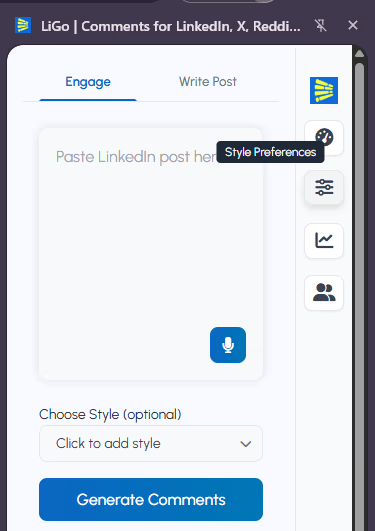
To begin creating custom post styles:
- Klicken Sie auf das Symbol der LiGo-Erweiterung in Ihrem Browser
- When the sidebar opens, click on the "Style Preferences" located on the right
- The Style Preferences page will open in a new tab
- Select the "Post Styles" tab in the menu
Alternativer Zugang: You can also find Style Preferences in the web app by going to the extension settings and selecting the Styles section.
Creating a New Post Style
To create a custom post style:
- Click the "Create a Style" button
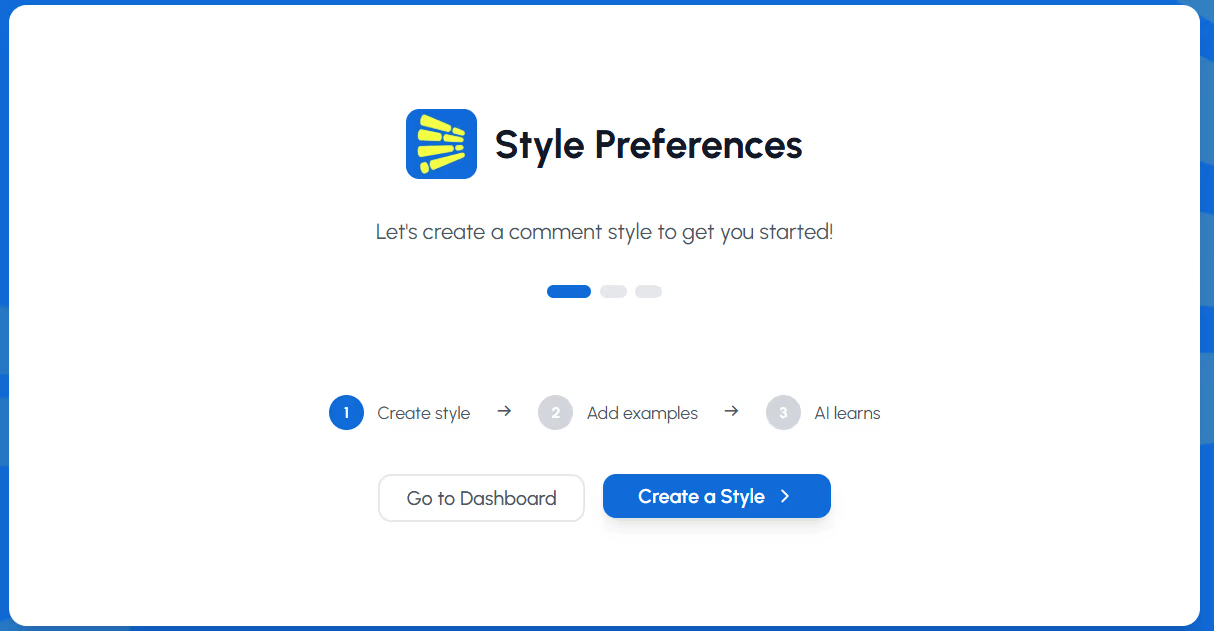
- In the popup dialog, enter a descriptive style name (e.g., "Thought Leadership" or "Case Studies")
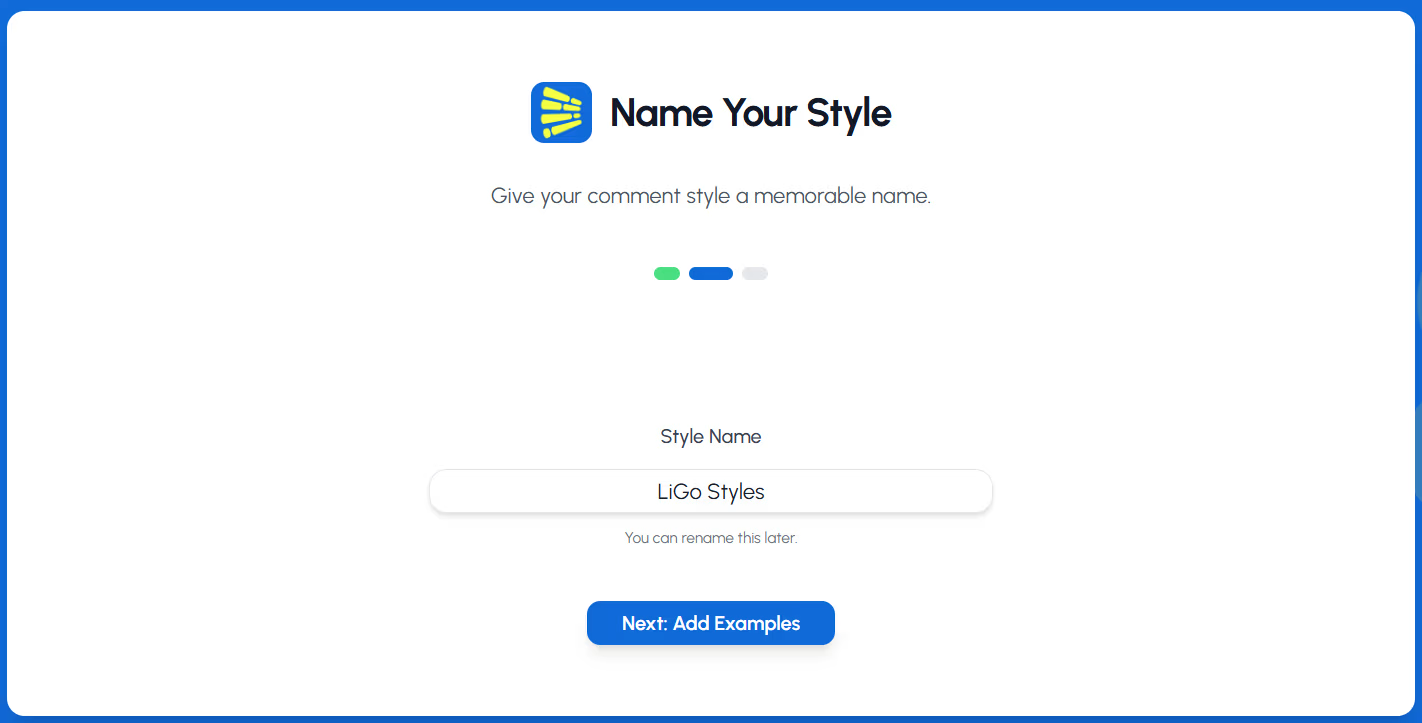
- Click "Next: Add Examples"
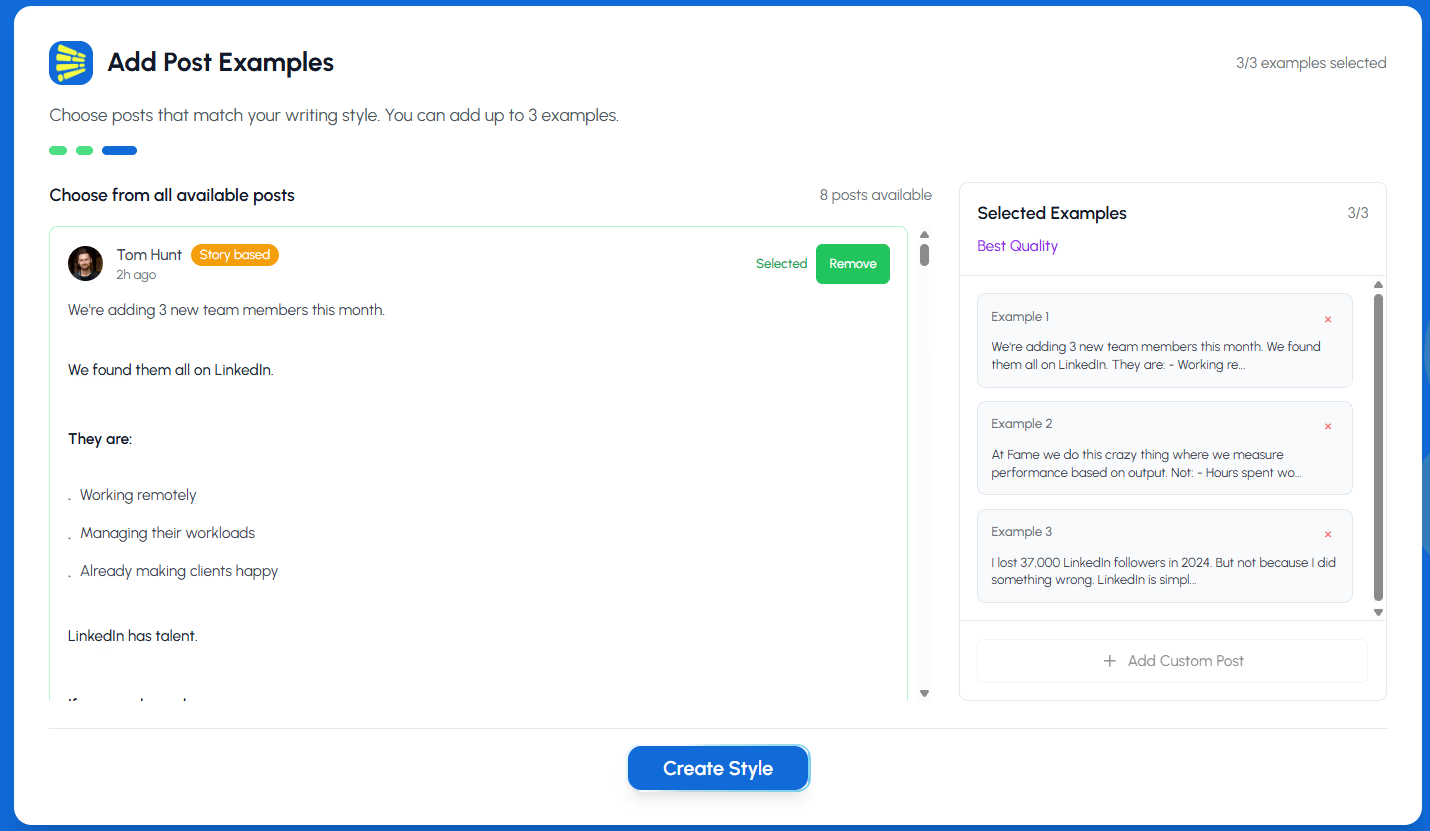
You will then be prompted to choose upto 3 example posts that reflect your thoughts and writing style. Once chosen, hit the "Create Style" button
Profi-Tipp: Create different post styles for different content purposes. For example, you might want one style for sharing industry insights, another for company updates, and a third for personal achievements.
Anpassungsstil-Funktionen
For each post style, you can toggle specific features:
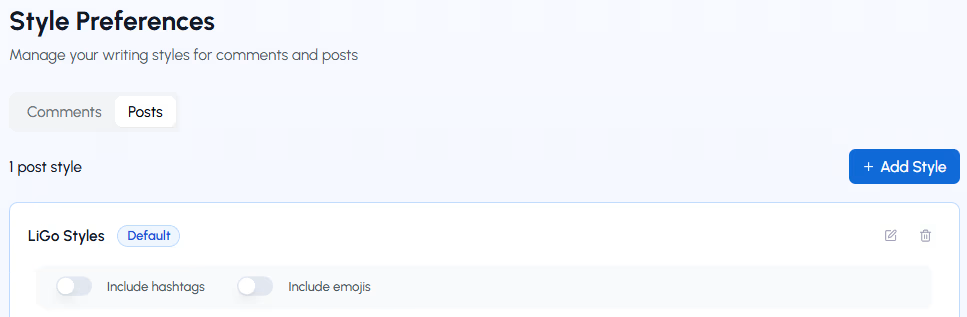
Emojis einfügen
- Toggle ON to allow the AI to incorporate appropriate emojis in generated posts
- Schalten Sie AUS für einen formelleren, nur textbasierten Ansatz
Hashtags einfügen
- Toggle ON to automatically include relevant hashtags in your posts
- Toggle OFF for cleaner posts without hashtags
Anmerkung: These toggles help shape the overall tone of your generated posts while maintaining your core voice and style.
Adding Example Posts
Der Schlüssel zu einem effektiven Stil ist, gute Beispiele zu liefern. Es gibt zwei Möglichkeiten, Beispiele hinzuzufügen:
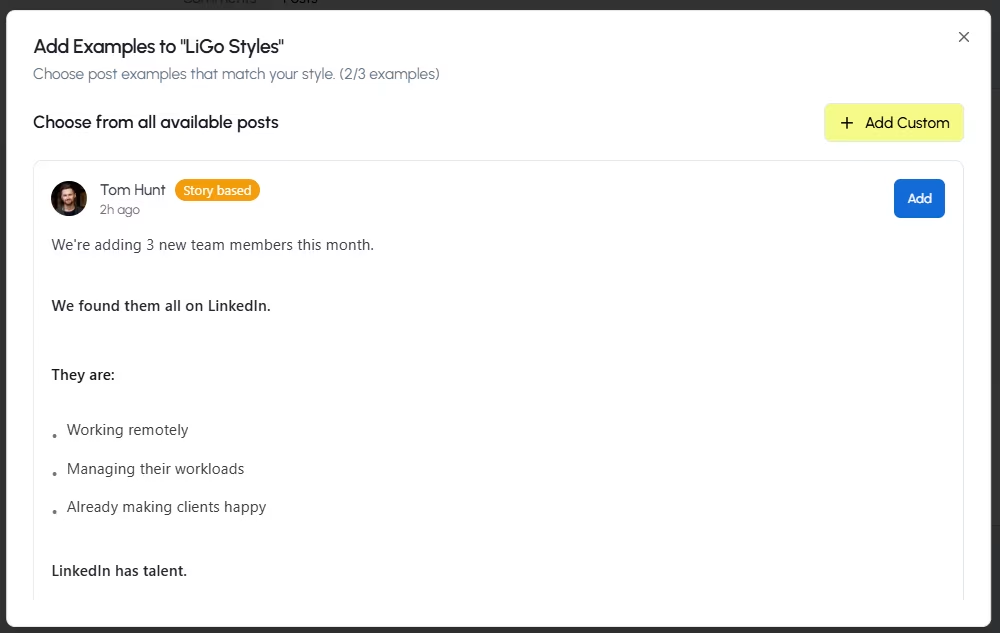
Methode 1: Eigene Beispiele hinzufügen
- Klicke auf "+ Beispiel hinzufügen" in deiner Stilkarte
- In the dialog box, enter or paste an example post that represents your preferred style
- These can be your own previous LinkedIn posts or content that matches your ideal style
- Klicken Sie auf "Hinzufügen", um das Beispiel zu speichern
Method 2: Choose from LiGo's Library
- Click "+ Add Example"
- In the "Help us learn your preferred style" dialog, scroll down to "Or Choose from Our Examples"
- Browse examples by category using the dropdown filter
- When you find a post style you like, click the "+" button to add it to your style
Was macht ein gutes Beispiel aus?
- Posts that reflect your authentic voice and content structure
- Examples showcasing your typical hook style, paragraph structure, and closing approach
- Different content types you regularly post (stories, lists, questions, insights)
- Posts that have performed well with your audience
Profi-Tipp: Include at least 3-5 diverse examples for each style to give the AI enough data to understand your preferred approach.
Managing Example Posts
Nachdem Sie Beispiele hinzugefügt haben, können Sie:
- Bearbeiten Sie jedes Beispiel, indem Sie auf das Bleistiftsymbol klicken
- Löschen Sie Beispiele, indem Sie auf das Papierkorb-Symbol klicken
- Fügen Sie bei Bedarf weitere Beispiele hinzu
- Klicken Sie auf "Mehr Beispiele anzeigen", um alle Beispiele in Ihrem Stil zu sehen
Anmerkung: The AI's understanding of your style improves with each example you provide. Consider adding more examples over time, especially if you notice the generated posts aren't fully capturing your voice.
Einstellung eines Standardstils
To make a particular style your primary option:
- Click "Make it default" on the style card you want to use most frequently
- The selected style will be automatically used when generating posts through the extension
Du kannst deinen Standard-Stil jederzeit ändern, indem du auf einer anderen Stilkarte "Make it default" auswählst.
Verwendung mehrerer Stile
You can create various post styles for different content strategies:
- Educational style for how-to and informational content
- Storytelling style for case studies and personal experiences
- Engaging style focused on questions and audience interaction
- Authoritative style for industry insights and thought leadership
Switch between styles when generating posts by selecting the appropriate style in the extension interface.
Tipps für Stilaufführungen
To get the most authentic posts:
- Include your best work: Add examples of posts that performed well and that you're proud of
- Vary your examples: Include different post structures, lengths, and topics
- Aktualisieren Sie regelmäßig: As your content strategy evolves, update your style examples
- Pay attention to hooks: Include examples with strong opening lines that match your style
- Consider format preferences: If you tend to use lists, questions, or other specific formats, ensure your examples reflect these
How Post Styles Appear in the Extension
When using the LiGo Chrome extension to create LinkedIn posts:
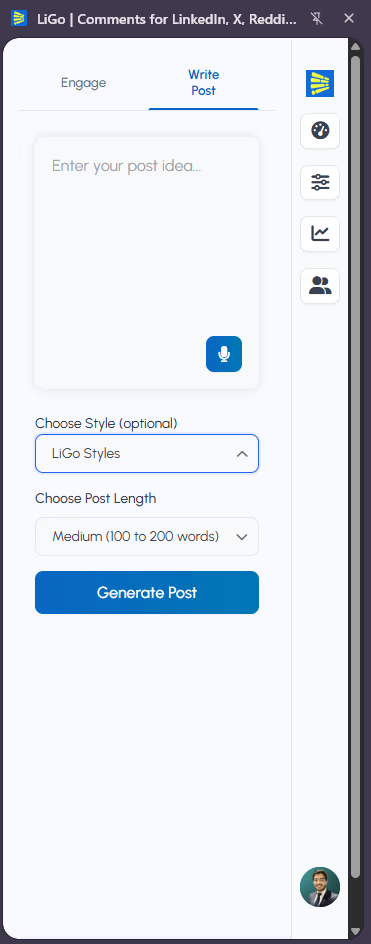
- Click the extension icon to open the sidebar
- Select the "Write Post" tab
- Enter your post idea or content
- Select post style (Optional)
- Choose Post Length
- Click "Generate Posts"
- The extension will show multiple options:
- 3 in your custom style (labeled with your style name)
- 3 in LiGo's optimized style
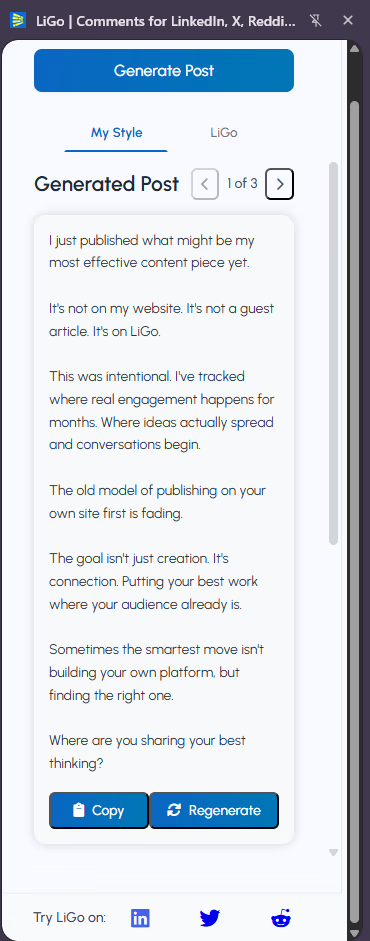
Profi-Tipp: Your default style determines which custom style is used for the "your style" variants. This gives you the best of both worlds-posts that sound like you, plus optimized alternatives.
Tipps zur Stilorganisation
For effective post style management:
- Create purpose-based styles: Organize styles by content purpose rather than tone
- Name styles meaningfully: Use descriptive names that help you remember each style's purpose
- Limit active styles: Focus on 2-3 core styles to avoid confusion
- Archive unused styles: Instead of deleting styles you no longer use, consider keeping them for reference
Refining Your Styles Over Time
As you use the extension, you may want to refine your styles:
- Monitor generated posts: Pay attention to which posts sound most like you
- Add successful posts: When you create a post you're particularly satisfied with, add it as an example
- Remove outliers: If certain examples are creating inconsistent results, consider removing them
- Adjust toggles: Experiment with emoji and hashtag settings to find your preferred balance
Häufige Fragen
How many examples should I include in each post style?
Beginne mit 3-5 Beispielen pro Stil. Du kannst im Laufe der Zeit mehr hinzufügen, um das Verständnis der KI für deine Stimme zu verfeinern. Das Minimum ist 1, aber mehr Beispiele führen zu besseren Ergebnissen.
Should my post examples be the full post or just snippets?
Include complete posts whenever possible. The AI learns from the structure, hook, body, and conclusion of your posts.
Can I use content from other platforms as examples?
Yes, but LinkedIn posts have a specific format and tone. For best results, use your actual LinkedIn posts or content specifically formatted for LinkedIn.
What's the difference between post styles and content themes?
Post styles affect the voice, tone, and structure of your content, while content themes determine the topics and subject matter. Using both together creates the most targeted content.
Woran erkenne ich, ob mein Stil gut funktioniert?
Generated posts should sound like you wrote them. If they feel off or use phrases you wouldn't normally use, add more examples or modify existing ones.